Or if you have separated your devices into subnets/VLANs. Which becomes more important as your get more hardware that you don’t really trust.
- 0 Posts
- 33 Comments
Joined 2 years ago
Cake day: June 16th, 2023
You are not logged in. If you use a Fediverse account that is able to follow users, you can follow this user.

 1·1 month ago
I’d suggest looking into TeamSpeak, like others have mentioned. Trivial to self host, too.
Edit: to be clear, this would cover the voice call aspect of discord, not the chat channels and other community tools. While it’s can do text chat, it’s more of a side feature rather than core. I didn’t think it does images or video, but it’s been a hot minute.
but you can do everything without it.
yes but why would you? There’s a reason we use GUIs, especially when new to a field (like virtualization).
 3·1 month ago
The 3$ isn’t a component price but also retail already.
The actual hardware cost of these devices is actually minimal. Basically any wifi capable microcontroller, a camera and depending on implementation some storage (or a micro sd-card holder). So that price is only cheap in comparison to existing products.
For reference, said microcontroller with basic camera can be had for like 3$ or something.
Sorry but the theoretical price of cells isn’t relevant to the consumer. The price of products containing them is. This thing costs currently on the official site 900€ (with some sort of sale going on). The Elite 100v2 with comparable capacity, but using LiFePo4 (included in the same current sale) costs just 550€. To add insult to injury, it also outperforms the Na model in nearly every aspect except sub-freezing performance (where it at least still works, but nowhere near normal spec values either). This includes an abysmal solar charging efficiency for the Na of roughly 50% at normal temperature. Somehow.
Again, once the price reflects the cell cost, this could be a very attractive option. At the moment, unless you’re into camping in sun-zero climates, it’s just a very bad deal.
Edit: to be clear the Na model also doesn’t have a better life expectancy, not according to the spec. Both models are specified to “over 4000 cycles”, not there is no percentage threshold specified for the Na model. The LiFePo4 model includes “to 80% capacity” in that definition. If this is specified somewhere for the Na model, I can’t find it.
The thing currently costs at least 50% more than the closest equivalent LiFePo4 from the same brand. The only real advantage seems to be it’s ability to handle sub freezing temperatures, but usability still drops dramatically (both capacity and available power delivery). Everything else is straight up worse in this one in direct comparison.
It’s only the first product, so it’ll most certainly get better. Also as numbers of products sold rise, costs fall. Once these are cheaper, that are a real choice.
Mine are of course also on a VLan but with no Internet access unless they need it for everyday operation (like a radio, or the amplifier that can play Spotify).
We don’t use the manufacturer apps at all. Everything is integrated into (fully local) home assistant. No need to open a specific app to operate a switch, or a light. Everything in one place. Trivial and incredibly clear. Things that can be are of course automated.
Just because it’s a “smart” service doesn’t mean it has to connect to the Internet or a server or the manufacturer. If it does neither, it can’t be turned off by them.
All my devices run local-only protocols. Nothing leaves my house. The devices that would be proprietary were reflashed to tasmota (fully open source, local only). Others are either Zigbee or Shelly. While Shelly has a cloud connection, it’s fully optional and disabled by default (including automatic updates). The hardware is also supported by tasmota, and reflashing is always just 5 minutes of effort away.
There is absolutely nothing that any manufacturer has to do to keep my stuff working. I have to do a little something (keep my tiny server on, basically). But more importantly there is nothing any manufacturer can do to stop my stuff from working.
 11·4 months ago
I think you keep missing my point. This isn’t about a “usual web form”. You aren’t entering your address or something. You’re configuring a service or server. Those are very different worlds. I understand that those kinds of forms where you enter your address (or whatever) wouldn’t ever have a default in there. In that context a default doesn’t make any sense (default name, default street, default city?). And even in the cases where it might, it would be - as you pointed out - unexpected for the kinds of users that usually fill out “web forms”.
When you’re configuring a server/service, that’s a very different world. Many fields could have defaults, and you wouldn’t want to hard-code those into your config. That is what this is. It’s essentially a web interface for a config file, which often has default values for any field you don’t specify for a variety of reasons. Defaults DO have special meaning here. That’s the whole point I’m trying to make! In that world it very much makes sense. The best way to show it is obviously a matter of personal taste, I actually like (and prefer) the greyed out way for reason I mentioned above.
Being shown what’s the default isn’t the same as having it actually in the field. For example the default might change, then these values would change with the default. There are also cases where they are inherited or something similar, where the upstream value isn’t as fixed as defaults normally are. So there is a functional difference to showing you a greyed out default and actually having that default be in the field.
Especially for things that essentially are a web interface for a config file where the config file gets larger with values that aren’t needed (this includes both NPM and Proxmox, as examples). Instead of like 3-4 lines it could now be like 20. It also becomes unclear when looking at the values later if they were actually set to that value intentionally or if it just happens to be the default that got filled in because some UI was used that filled all fields with their default values.
Showing the default outside in a label or as a tooltip-hover is an option, but has implications for the space needed and readability. And this way is actually much clearer if you want to look over a config and you need for example the default port or something, it’s in the exact place you expect it, shown in grey to make it clear that it wasn’t set intentionally but that it’s just the default. In some UIs there’s room for defaults, in some not. I personally vastly prefer them to be shown like this, as you might have guessed already.
Yea I realized that only after. I agree it’s slightly different from the grey text in text fields, but it still illustrates the point because it’s also an implicit default value (that happens to be unchangable in this context). So it kinda applies, but yea not quite the same.
I’m coming from the perspective of administrative interfaces, not generic forms. See my other reply for the examples that I use daily that made me have a different “intuition” here. Edit: But the fact that I got three replies in like a few minutes also shows that my perspective might not be the universal one. Still, I think it does hold up in the context of administrative interfaces (which is what NPM is).
always […] why would it be an implicit default?
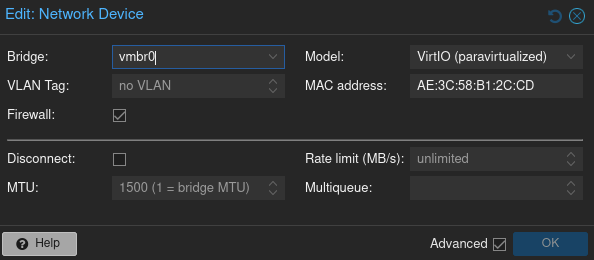
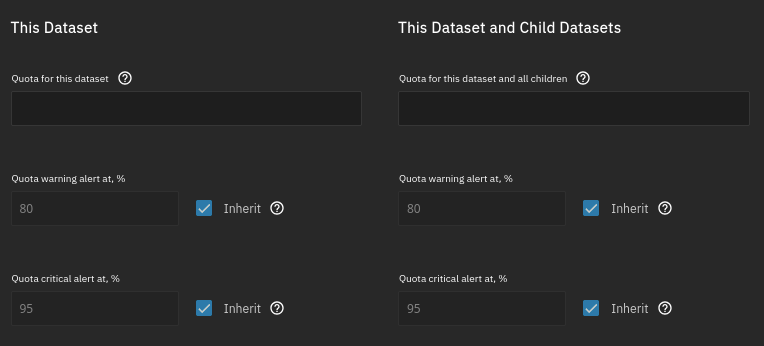
Cause that’s what I intuitively expected, because in the tools that I use daily, that how it is there. Here are some examples of other administrative web interfaces that use grey to show you the implicit default that I happen to have running and could find in like 3 minutes. So much for your overconfident “always”:
- Proxmox PVE or PBS. Basically every dialog. Example network interface configuration:
- TrueNAS, example “Add Dataset”
- OPNsense, example “Firewall Rule”, the destination port range has an implicit default and is grey:

Note: I’m not talking about a form to fill in your name with “john doe” or whatever, and even that I can’t even remember seeing either. Cause it just says “Name:” and nobody needs an example.
- Proxmox PVE or PBS. Basically every dialog. Example network interface configuration:
80 being grey suggests it’s the implicit default, not an example. Like in any other input mask like this. That is a very reasonable company and not intuitive at all.
Weird, my desktop interface isn’t any of those things. Huh.
ARC is the in-memory cache used by ZFS. If it’s completely off the effect can be dramatic. Under no circumstances should a larger cache cause anything to get slower, ever. Even the raspi didn’t have memory that is that slow that this is a reasonable outcome. By default on most distros, ARC size is capped to 50% of physical system memory. Keep in mind it is a cache: if something else needs needs the RAM, it will be released.
As a concrete example: I was recently working on a server where a maintenance task that should take like 12hrs or so at the worst somehow took 2 weeks (!) and still wasn’t finished. That was ARC being disabled.
What size is the ARC set to? I’ve seen cases where it was fully disabled, which (unsurprisingly) seemed to murder performance and is probably even worse when in such a CPU limited platform. You stating that only 1.5 GB of 16 GB were in use makes this seem likely.
In general, if you care even remotely about performance, a raspberry pi is probably the wrong choice for a NAS. Even a single disk should have no issues saturating a 1gbe link. That being said, even a pi should manage 1 GBit/s on ZFS, especially when reading.
ZFS, specifically RaidZx, can be expanded like and raid 5/6 these days, assuming support from the distro (works with TrueNAS for example). The patches for this have been merged years ago now. Expanding any other array (like a striped mirror) is even simpler and is done by adding VDevs.
It’s the same with other vendors though. I man those that allow you to swap internals without losing warranty. Bought my laptop with just a 16g stick (base price/included), then bought 2x24g for the price one additional 16g module would’ve cost. And now I got a 16g module left over, too.